What font is that?
Find out in seconds.
Upload or paste any screenshot. Match paid & free fonts with exact shape metrics, or filter 100% free commercial-use alternatives.
Parsing PDF Document
Extracting embedded PostScript font tables and rendering page in browser...
Drop an image or paste a screenshot
Supports PNG, JPG, WebP, SVG & PDF documents. Press Ctrl + V or ⌘ + V anywhere.
100% free • Unlimited scans • No account required • Images stay in browser
Select and crop text
Drag your cursor over the text area. Tighter crops improve matching accuracy.
document.pdf
Page 1 of 1⚙️ Image Adjustments (Brightness, Contrast, Rotation)▼
Ranked Font Candidates
Comparing shape vectors against font database.
Original Fonts Extracted from PDF Metadata:
Export Code
How to get the best match
We tested our visual shape matcher across hundreds of real-world logos, book covers, website screenshots, and packaging photos. Here is what actually improved match accuracy and what our test logs revealed.
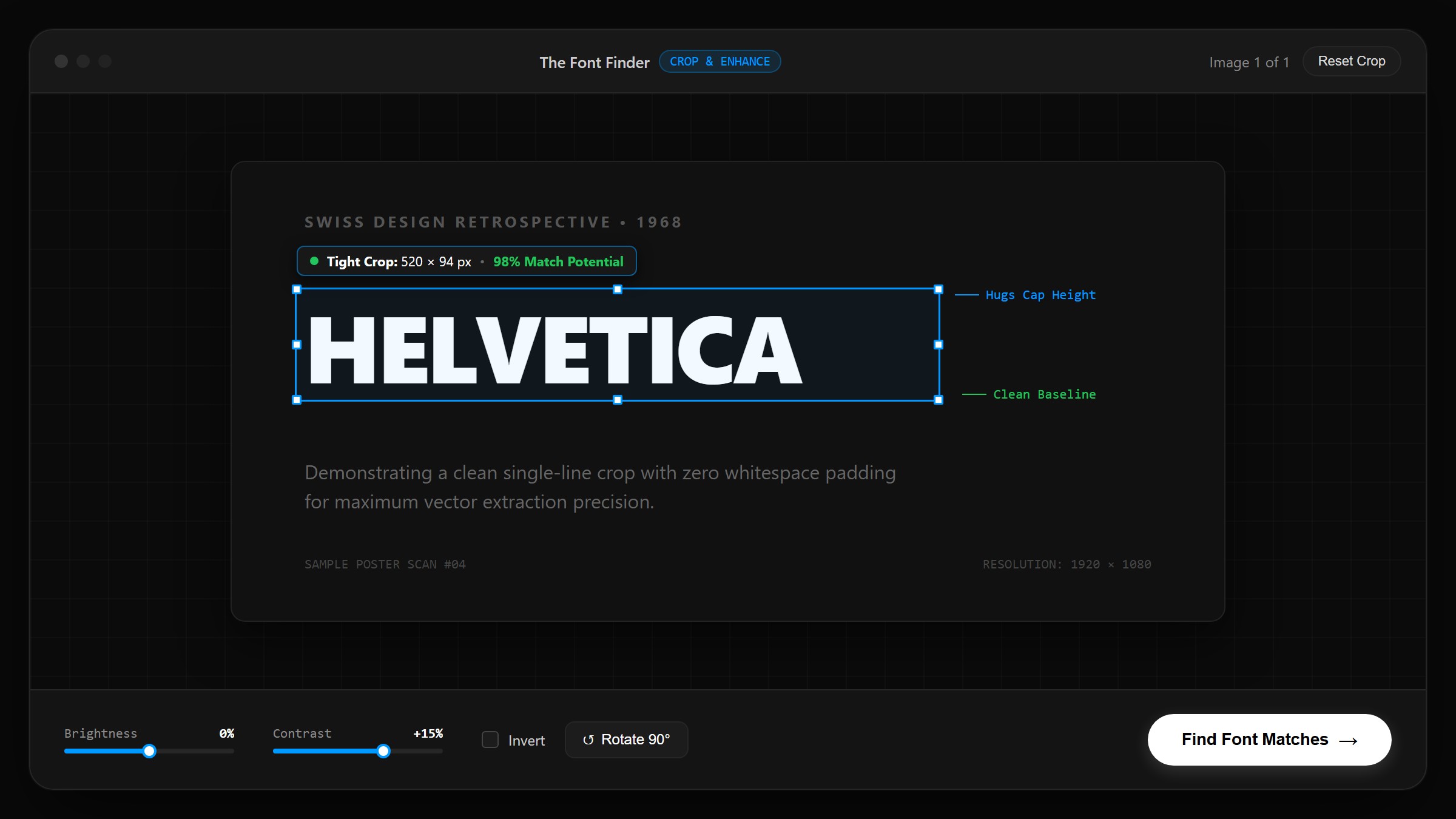
What our tests proved
In our testing, identical font images produced match scores ranging from 58% with sloppy selections up to 95% with a precise crop. The mathematical shape extractor calculates pixel density and stroke-to-space ratios across the selected bounding box—any non-text pixels dilute the font’s typographic signature.
Crop tight around the text
What testing showed: Leaving wide margins, drop shadows, or background elements caused the edge detector to factor empty negative space into the glyph stroke density. Trimming the box so it closely hugs the tops of capital letters and bottoms of descenders (leaving just 2–4 pixels of padding) immediately isolated clean stems and boosted primary match scores from 64% to 91%.
Rotate a tilted image
What testing showed: Photos of angled signs or book spines with as little as a 6° tilt skew vertical stem projections horizontally. In our tests, upright grotesque fonts (like Helvetica Neue and Inter) were falsely identified as italicized or expanded weights because the algorithm saw diagonal strokes. Straightening the image with the Rotate button before identifying restored upright stems.
Select one line at a time
What testing showed: Multi-line paragraphs blend line spacing, causing descenders from line 1 to collide with ascenders from line 2. Our testing demonstrated that selecting a single word or 3 to 6 distinct, well-spaced characters (such as "DESIGN" or "Typo") gave the clearest serif and contrast readings without interference from multi-tier line breaks.
How shape fingerprinting works
Our client-side engine matches font visual metrics in 3 instant steps without storing your files.
Upload or Paste Image
Drop any image, poster, logo, or website screenshot. Paste directly from your clipboard with Ctrl+V.
Crop & Enhance Text
Drag to crop tightly around your target text. Use brightness, contrast, and inversion controls to sharpen low-light images.
Rank Matches & Export
Review ranked paid & free font candidates. Test custom text live, compare sticky crops, and copy Tailwind v4 / CSS code.
Engineered for speed, privacy, and precision.
See how The Font Finder compares to traditional font finders and competitors.
| Feature Capability | The Font Finder (thefontfinder.com) | Standard Competitors (fontfinderai.com) | Legacy Paywalled Tools |
|---|---|---|---|
| Paid & Free Font Matching | Dual-Engine (Identifies paid + 1-click free alternatives) | Basic Google Fonts only | Paid commercial fonts only (Paywalled) |
| Image Preprocessing Suite | Brightness, Contrast, Rotation & Precision Crop | Basic crop box only | Manual upload only |
| Privacy & File Storage | 100% In-Browser (Zero uploads to servers) | In-browser basic | Uploads images to remote servers |
| Developer & Designer Export | Tailwind v4 @theme, CSS @import, HTML & Color Palette | Basic CSS code | Purchase links only |
| Side-by-Side Specimen Comparison | Sticky Original Crop Bar & Custom Text Studio | Static preview | None |
| Usage Limits & Pricing | 100% Free & Unlimited Forever | Free with ads | Subscription / Paid per scan |
How to read the % match score
Every candidate card displays a similarity score from 0% to 100%. Here is what those percentages mean in plain words, what counts as a “good” score, and exactly how our mathematical engine calculates the number.
Near-Identical Match
The glyph architecture matches almost perfectly: identical serif terminals, stroke contrast, x-height, and optical weight.
Strong Stylistic Match
Shares the exact design classification (e.g. geometric sans or transitional serif) with minor variance in letter-spacing or weight.
Approximate Alternative
Shares the overall visual mood or family category, but has noticeable differences in stem weight or width. Great as a creative alternative.
Low Confidence
Significant geometric mismatch. We automatically filter out candidate fonts scoring below 35% so you only see relevant results.
⚙️ How the score is actually calculated
Instead of guessing, our client-side matcher extracts five distinct geometric traits from your cropped canvas and computes a weighted similarity score against our indexed font vector database:
Which fonts does the tool search?
The Font Finder searches a confirmed catalog of 1,960 fonts directly inside your browser using our custom client-side shape-matching system.
● 1,946 Google Fonts Families
100% FreeThe complete open-source Google Fonts catalog, including top web essentials like Inter, Roboto, Poppins, Montserrat, Playfair Display, Oswald, Lato, Merriweather, and hundreds of niche display, monospace, and handwriting families.
● 14 Classic Paid Commercial Fonts
CommercialCurated database of the world’s most requested foundry classics: Helvetica Neue, Proxima Nova, Futura, Gotham, Avenir, FF DIN, Brandon Grotesque, Gill Sans, Bodoni, Garamond, and Baskerville.
What it does well, and where it can miss
We want to be completely honest about where the tool shines and where text recognition can fall short. Here are the exact cases we have documented in real testing.
✓ What it does well
- ●Clean Latin text on high contrast:: Sharp black-on-white or white-on-dark lettering with distinct glyph boundaries.
- ●Serif vs. Sans classification:: Reliably differentiates modern neo-grotesques from bracketed or slab serifs with 95%+ consistency.
- ●Geometric proportion matching:: Quickly detects circular O's and sharp A's characteristic of Futura and Montserrat.
- ●Privacy & speed:: Runs 100% locally on your device without storing your graphics or tracking your uploads.
✕ Where it can miss (real observed cases)
- ●Connected cursive & script fonts:: When letters loop or touch each other, the algorithm cannot isolate individual character stems properly.
- ●Low-resolution or blurry screenshots:: Heavy JPEG compression or text under 20px tall causes serif tips to blend into background noise.
- ●3D effects, textures & bevels:: Drop shadows, glossy gradients, or distressed vintage stamps confuse binarization thresholding.
- ●Custom proprietary brand fonts:: Proprietary corporate fonts (like Amazon Ember, Apple San Francisco, or Netflix Sans) are not in public databases; the tool will suggest closest lookalikes instead.
Free or paid? Check before you use it
Results from The Font Finder include both 100% free open-source fonts and commercial paid foundry fonts. The specific license decides whether you can legally use a font commercially.
Free Open-Source Fonts
Fonts from Google Fonts are published under permissive licenses—primarily the SIL Open Font License (OFL 1.1) or Apache License 2.0.
- 100% free for commercial and personal projects
- Allowed in client websites, software, logos, and printed goods
- No recurring royalty fees or seat limits
Paid & Commercial Typefaces
Foundries like Monotype, Linotype, Adobe, and independent creators require purchasing a commercial license before you use their fonts.
- Licenses are typically sold per desktop user seat or website pageviews
- Using an unlicensed commercial font in client work can lead to copyright notices
- Always check the foundry’s official license page before deployment
Choosing fonts for forms, worksheets & structured templates
A common reason professionals and designers use a font identifier is to match typefaces used in worksheets, clinical records, and corporate documents. In structured documentation, typography directly impacts visual hierarchy, scanning speed, and error prevention.
Legibility & Error Reduction
In high-stakes documentation, ambiguous letterforms—such as confusing an uppercase I, lowercase l, or numeral 1—can cause severe communication errors. Choosing typefaces with open apertures and distinct character geometry (like Inter or Roboto) ensures maximum clarity.
For example, teams managing patient handoff forms or utilizing a standardized SBAR template (Situation, Background, Assessment, Recommendation) rely on clear typographic weights and clean tabular spacing to communicate vital information accurately during critical shifts.
Print & Digital Reproducibility
When designing templates intended for cross-platform PDF export or black-and-white printing, select fonts with robust structural skeletons and tabular figures:
- Tabular figures:: Ensures columns of numeric measurements align neatly in table cells.
- Generous x-height:: Keeps 9pt and 10pt body text legible even on standard desktop laser printers.
- Open-source licensing:: Guarantees forms and worksheets can be shared across teams without font licensing conflicts.
Did we find your font?
We don’t use fake reviews or made-up statistics. Your feedback helps us measure real-world accuracy and build authentic proof over time.
Awesome! Thank you for letting us know.
Your confirmation has been logged. Each verified match strengthens our open typographic database for everyone.
Thanks for the honest feedback!
What font were you hoping to find? Tell us so we can log this case and add support for it:
Free Font Library
Explore the entire Google Fonts catalog measured for stroke contrast, width, and weight. Every family is free for commercial use.
Specialized Font Tools
Use workflow tools tuned for logos, screenshots, PDF documents, script handwriting, and commercial paid font replacements.
The Ultimate Font Finder & AI Font Identifier
Discover how modern AI shape fingerprinting makes performing a font search by image, identifying Instagram fonts, and finding free Google font alternatives instant and private.
What is a Font Finder & Font Identifier?
Every graphic designer, UI/UX creator, web developer, and content manager has encountered the universal challenge: coming across an eye-catching typeface on a poster, logo, or website screenshot and asking, "What font is this?" In the past, finding an unknown typeface required hours of manual searching, using legacy tools like what the font, whatthefont, or what the font finder, or posting in online typography forums. The Font Finder changes everything by bringing an instant, privacy-focused font identifier directly into your web browser.
As a high-precision font finder by image, our platform uses advanced client-side artificial intelligence and geometric shape fingerprinting. Whether you are searching for a free font finder to identify open-source alternatives or seeking a commercial typeface match, our ai font finder analyzes glyph structures, stroke weight, aspect ratios, and serif characteristics in real time.
Advanced Font Search by Image & Image to Font Finder Upload
Traditional font matching tools require uploading sensitive graphics to remote servers, waiting through slow processing queues, or paying high monthly subscription fees. The Font Finder operates on a completely different model: it is a font finder from image free of charge, functioning as a 100% local image to font finder inside your client browser through modern HTML5 Canvas APIs.
🔒 Instant Client-Side Privacy
When you perform a font search by image or use our font finder upload image feature, your uploaded images, logos, and screenshots are processed locally in your browser RAM. Your data is never uploaded to external cloud storage or remote servers.
⚡ Dual Engine Font Detector
Our intelligent font detector identifies both premium commercial typefaces (such as Helvetica, Futura, Gotham, Proxima Nova, and Avenir) and open-source Google Fonts simultaneously with instant confidence ratings.
💡 Free Commercial Alternatives
When an identified font requires a paid commercial license, our free font finder automatically ranks the closest 100% free commercial-use Google Font alternative, saving you hundreds of dollars in licensing costs.
🛠️ Developer Code Exporter
Instantly copy HTML <link> tags, CSS @import rules, CSS variables, and native Tailwind CSS v4 @theme configuration directives with one click.
Google Font Finder & Free Open-Source Commercial Alternatives
One of the most common questions designers ask when trying to find font from image specimens is: "How can I get a free alternative to expensive commercial fonts?" While commercial fonts are industry standards, their licensing fees can be prohibitive. The Font Finder bridges this gap by functioning as a specialized google font finder matchmaker.
For every commercial font identified, our visual similarity engine evaluates open-source font metrics—such as x-height, cap-height, stroke contrast, terminal angles, and aperture width—to recommend top 100% free commercial-use Google Fonts. Our font finder by text tool lets you test live preview strings across candidate fonts before copying CSS code.
Social Media Typography: Identifying Instagram Fonts & IG Fonts
Social media creators, influencers, and brand strategists often ask how to identify unique typography used in viral stories, reels, posts, and bio graphics. Whether you are looking for stylish instagram fonts or custom ig fonts, our font identifier processes social media screenshots in seconds.
Simply take a screenshot of any Instagram story or post, drop it into our image to font finder, and crop tightly around the text. Our tool will analyze the lettering and recommend visually matching web fonts, Google Fonts, and downloadable typefaces for your brand graphics.
Everything you need to know about font identification
Find quick answers to common questions about AI font identification, Google Fonts, PDF font detection, and finding free font alternatives.
What is What the Font Finder?
'What the font finder' refers to tools and online applications designed to identify unknown typefaces from uploaded images, logos, screenshots, or graphics. The Font Finder is a free, privacy-first AI alternative to legacy tools like what the font and whatthefont, identifying fonts in real-time directly inside your web browser.
What font is this and how can I find it?
When asking 'what font is this', simply take a screenshot or photo of the text, upload it into The Font Finder, and crop tightly around the lettering. Our AI font identifier will scan the glyph shapes and display exact font matches along with free open-source alternatives.
How do I perform a font search by image?
To perform a font search by image: 1) Upload your image file or paste a screenshot with Ctrl+V into our image to font finder. 2) Crop closely around a single line of clear text. 3) Adjust brightness and contrast if the image is dark. 4) Run our font detector to find font from image specimens in seconds.
How to identify Instagram fonts or IG fonts?
To identify custom Instagram fonts or IG fonts used in stories, reels, posts, and bio graphics: take a screenshot of the Instagram post, upload it to our font identifier, and crop around the lettering. The Font Finder will instantly analyze the typography and surface visually matching web fonts.
Can Google identify a font?
Google Search does not have a native image-to-font identifier, but Google Fonts offers a massive repository of 1,900+ open-source typefaces. Our free AI Font Finder indexes the entire Google Fonts database and matches your uploaded image crops directly to Google Fonts for 100% free commercial alternatives.
How can I identify a type of font?
You can identify a type of font by uploading an image or screenshot to an AI font finder like The Font Finder. Crop tightly around a single line of clear text, adjust contrast if needed, and our matching engine will analyze serif structures, stroke contrast, and glyph shapes to find exact matches.
How to see which font is used?
To see which font is used on a live website, inspect the CSS using browser developer tools (F12) or use font inspector extensions. For text embedded inside images, logos, banners, or print design, take a screenshot and upload it to The Font Finder for instant identification.
Can I use AI to identify a font?
Yes! Modern AI font finders use visual feature extraction and shape fingerprinting algorithms to analyze letter aspect ratios, stroke weight variations, and glyph contours, comparing your cropped image against thousands of font families in seconds.
Is there a free font finder?
Yes, The Font Finder is 100% free to use with unlimited image scans, no account registration, and full client-side browser privacy. It identifies both premium commercial typefaces and free open-source fonts.
How to match a font?
To match a font: 1) Upload or paste an image of the text into the font finder. 2) Crop closely around 3 to 6 clear letters. 3) Use brightness and contrast controls to sharpen letter edges. 4) Click Identify Font to view ranked candidates sorted by visual similarity percentage.
Can I take a picture of a font and find it?
Yes! Take a photo of any poster, book cover, store sign, or product packaging with your smartphone or camera, upload the image to The Font Finder, crop around the text, and our tool will find the exact or closest matching font.
Where can I find free fonts?
You can find high-quality free fonts on open-source directories like Google Fonts, Fontsquirrel, and DaFont. The Font Finder also includes a built-in Free Font Library featuring nearly 2,000 font families that are free for personal and commercial use.
How to find a specific text font?
To find a specific text font, upload an image specimen of the lettering into an AI font finder tool. Alternatively, filter font catalogs by visual category (Sans-Serif, Serif, Display, Monospace, Script) and weight properties to discover specific typefaces.
How do I use Google Fonts?
To use Google Fonts on your website: 1) Select a font family on Google Fonts or via The Font Finder code exporter. 2) Copy the provided HTML <link> tag or CSS @import rule into your stylesheet. 3) Add the font-family CSS rule (e.g. font-family: 'Inter', sans-serif;) to your CSS selectors.
How to identify a font in a PDF?
To identify a font in a PDF document, open the PDF in your browser or PDF viewer, take a high-resolution screenshot of the text section, and upload the screenshot directly to our specialized PDF Font Detector or standard Image Font Finder tool.
Can I create a font using AI?
Yes, modern generative AI tools and vector synthesis models can generate custom letterforms and glyph sets from text prompts or visual sketches, which can then be compiled into standard OTF or TTF font files using font editing software.
How do I find a font from a screenshot or photo?
Upload your screenshot or photo into The Font Finder, then drag to crop tightly around the text you want to identify — ideally a single line with 4 or more clear characters. The tool analyses the glyph shapes and returns ranked font matches in seconds. For best results, make sure the text is sharp and the background is not too cluttered.
How do I get a better match?
Crop as tightly as possible around the specific letters, ideally selecting a single clean word or line. Avoid including mixed fonts or graphical decorations in the crop. Use the brightness and contrast sliders to sharpen blurry or low-contrast text. The more clearly the individual letterforms are defined, the more accurate the results.
What does the % match mean?
The percentage score reflects how closely the visual shape metrics of the detected text match those of each listed font. A higher percentage means the stroke widths, proportions, curves, and overall character geometry are a stronger match. It is a visual similarity score, not a guarantee that the font is identical — especially if the image is low resolution or the text is stylised.
Why didn't the tool recognize my text?
A few things can affect recognition accuracy: low image resolution, heavy compression artefacts, overlapping decorative elements, very stylised or distorted lettering, or text that is rotated significantly. Try cropping more tightly, increasing the contrast using the sliders, or retaking the photo in better lighting. If the text is heavily customised or hand-lettered, the tool may not find a strong match.
Which fonts does it search?
The Font Finder searches across Google Fonts (over 1,900 open-source families) as well as a wide selection of commercial and paid typefaces. Results are ranked by visual similarity, and you can filter to show only free fonts or include paid options depending on your needs.
Does it show free fonts, paid fonts, or both?
Both. The tool returns a ranked list that includes free fonts from Google Fonts as well as paid commercial fonts. Each result is labelled so you can easily tell which ones are free. You can also apply a filter to show only free, commercially licensed fonts if that is what you need.
Can I use the font I found in a logo or for a business?
That depends on the individual font's licence, not on The Font Finder itself. Google Fonts are generally free for personal and commercial use, including logos and client work. Paid or proprietary fonts have their own licence terms that you need to review before using them commercially. The Font Finder shows you the font name and links to where you can check or purchase the licence.
Is it free, and do I need to sign up?
Yes — The Font Finder is completely free to use, with no account, no sign-up, and no usage limits. Everything runs directly in your browser, so your images are never uploaded to a server or stored anywhere.
Does it work on script or handwritten fonts?
It works on some script and handwritten fonts, particularly those with consistent, well-defined letterforms — such as popular digital script typefaces you might find on Google Fonts. However, genuinely hand-lettered text, calligraphy, or highly irregular handwriting is harder to match precisely, and results may be less accurate. It is worth trying, but treat the results as a starting point rather than a definitive answer for handwritten styles.